Project Overview
Agents Office is a multi-agent software engineering orchestrator. The local version turns a feature request into a step-by-step task plan, assigns each task to an AI coding agent (Claude Code or OpenAI Codex), and runs independent tasks in parallel across multiple repositories.
The hosted version is a visual workspace that opens in a labeled, scripted Demo. Live mode lets visitors connect their own OpenAI or Claude API for conversations, task planning, teammate handoffs, and code suggestions. Both versions have public source code.
Problem / Context
Working across multiple coding-agent sessions introduces coordination overhead: deciding what to do next, keeping the right context, and knowing which tasks and sessions are still active.
Agents Office brings planning, task coordination, session management, and usage visibility into one interface. The public entry lets visitors explore the workflow before connecting their own AI.
Key Features
- Default Demo with preset PM planning, teammate handoffs, and summaries.
- Live mode using each visitor's OpenAI or Claude API key and model.
- Streaming replies, plan confirmation, and dependent team tasks.
- Per-connection chat, key, plan, and provider-reported token usage.
- Disabled uploads with a visible explanation about reducing running costs.
- Local CLI version that runs independent tasks in parallel across repositories, with role-scoped tools for each agent, plan approval before any code changes, and session recovery.
Tech Stack
The current interface uses native JavaScript, DOM, and SVG. The server uses Express and the ws WebSocket library. AWS hosting uses Docker on EC2 with a CloudFront HTTPS entry. Earlier Phaser sources remain in the repository.
Architecture
A browser connects to the hosted Node.js server. Express serves the interface, and WebSocket messages carry chat, plans, handoffs, and status updates. Each connection owns its own state. Live requests go to the visitor's selected provider; keys stay in connection memory and are cleared on disconnect or return to Demo.
The public runtime provides chat and code proposals. The separate local CLI runtime works with the developer's project files and installed tools. The public container uses a temporary home and receives no mount of the owner's saved local workspace.
Technical Challenges
Passing full histories between sessions added context that the next task did not need. I replaced full-history context passing with fresh sessions and compressed handoffs, and added per-agent token-usage monitoring to make the cost of each step visible.
Interruptions are another concern: the workflow needs to retain what has already been completed so work can resume without starting the whole plan again.
Engineering Decisions / Trade-offs
- Keep repository execution in the local version, where the developer configures projects and installed tools.
- Make the hosted Demo the first entry, with clearly labeled sample replies and zero model calls.
- Let Live visitors use their own API account, with a per-connection key and chat context.
- Disable uploads to reduce running costs; reject uploads in the interface, server, and proxy.
- Use WebSocket updates for a live view of agent activity.
- Use explicit task plans, confirmation workflows, and session records to make coordination inspectable.
- Prefer focused session context and compressed handoffs over repeatedly passing the full history.
Plan confirmation is a workflow step, not a security sandbox. Configured agents can modify local files and execute commands; the project is intended for trusted local projects.
Screenshots
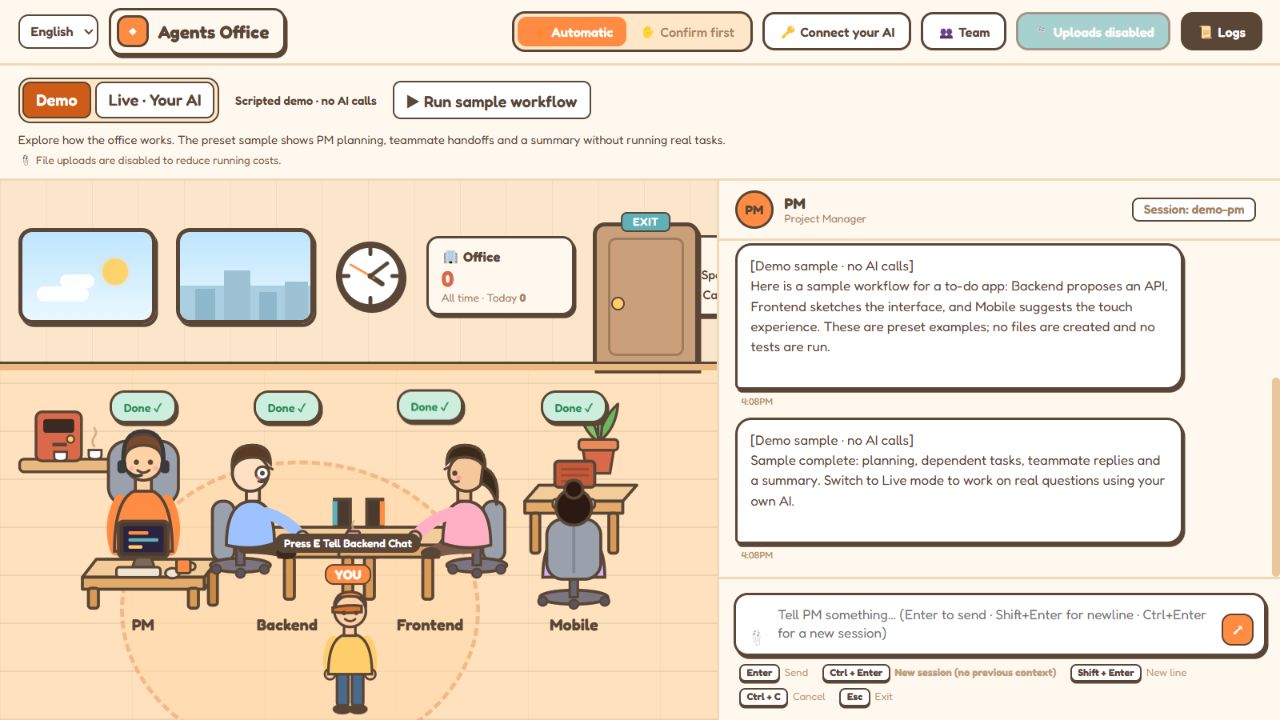
An actual browser capture of the hosted Demo shows the sample workflow, teammate statuses, and disabled upload control. Sample replies are labeled throughout the interface.
Results
Replacing full-history context passing with fresh sessions and compressed handoffs reduced AI workflow token usage by 86% (5.3M → 0.73M tokens), with detailed token-usage monitoring across agents.
The public Demo and visitor-API modes are deployed on AWS. Verification passed for password-free access, upload rejection, the sample workflow, per-visitor connection state, and a 70-second WebSocket heartbeat. The release passed 51 automated tests and an ARM64 image/proxy check. Paid provider responses were tested with isolated fixtures; no real paid API key was used for acceptance.
Live Demo / GitHub
Not compatible with mobile. Please open the demo on a desktop browser.
Live Demo GitHub for Agents OfficeOpen Live Demo to explore the sample first, then choose Live mode to connect your own AI. The repository includes instructions for both the public app and the original local CLI version.